

There are many options available when it comes to mocking API response, like, JSON server or even having a response JSON file added to your solutions, to cite a few. In this article we will see how Azure function proxies can be used to mock API responses.
Azure function provides an elegant option to mock API response using proxies. Using a Azure function proxy, you can provide a mock endpoint which can be used by your team to continue their work till your actual API is ready for integration.
Let us go ahead, create a simple proxy and see how the mock response is served.
We will be creating a proxy end point which will service a GET call, say, getCustomer. Our getCustomer API method is expected to provide a response in the below format. So, till getCustomer is up and ready for consumption, our proxy can be used to get the below JSON as mock response.

Below are the steps for create a Function proxy.
Step 1: We will create an Azure function app which will host the proxy. (If there is already a general purpose / maintenance Function App present we can use that.)


Step 2: Now that we have created the function app to host our proxy, let us create our proxy. Choose the “Proxies” item in the Azure function blade as shown below. Click on “Add” to create a new proxy. We will call this MockCustomerAPI

And we will provide a route /api/getcustomer. In the HTTP Method section, we select “GET”. Please note that we can choose to mock other HTTP methods like POST as well.
Step 3: This is the step where we will provide the response we want the proxy to send us back. We will override the response as shown below by expanding the “Response override” link and paste our mock response in the space provide in Body section.

We can provide the status code and status message as per our use case and click on “Create”. Once the proxy gets created successfully we will be provided with a link to access the proxy as shown below
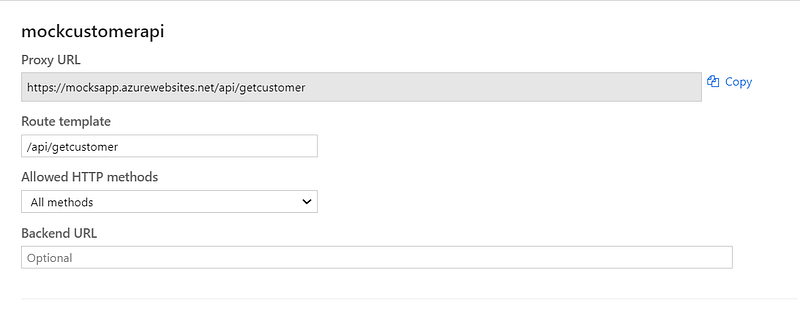
Step 4: Now that we are done with creating the proxy, let us test. To test our proxy, copy the generated proxy URL and open in the browser. We will see the response as below

Thus, we have created a proxy for the getCustomer API which can be used by the UX team or other API teams to integrate during the early development cycles when our API is not ready yet. Please do note that mocks are not just for GET method, you could do other HTTP methods as well
Some of the advantages of this approach are
- Mock API responses unblocks the collaborating team like UX team as they can work against the mock endpoint till the actual API is ready
- Testing is easier and thorough if your API relies on a partner API. Creating a mock endpoint gives you the flexibility to change the response and test your code for all possible, allowed parameter values from the partner API
- If there is a dependency on partner API which is not available in your lower environments, you can resort to creating a proxy in lower environment.
- As it is hosted in a common URL, same contract will be used across all crews consistently. Any change done to the contract will be immediately visible to all the consuming developers.
- Eliminates the need of having a separate JSON response file or JSON server on local dev box and thus ensure you are developing against the latest contract
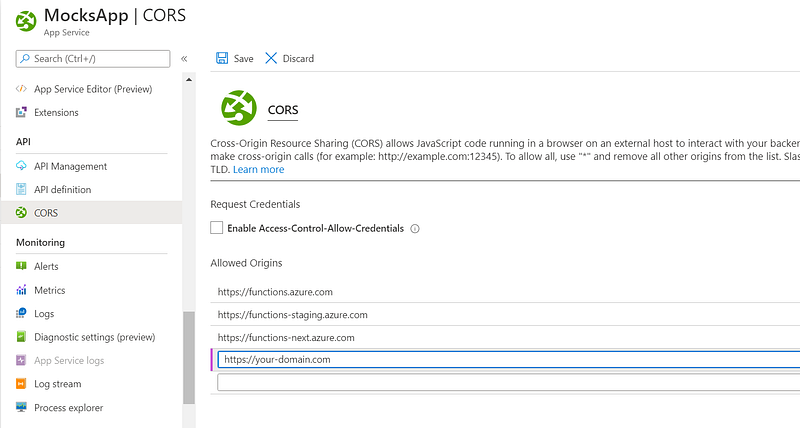
Before we conclude, a note about CORS: If you are hitting the proxy from your front-end web application, please ensure you tweak the CORS setting for the mock function app accordingly as show below
Conclusion
There are many useful feature of Azure function Proxies like redirection and route template parameters. You can read more about Azure Function proxies in official Microsoft documentation.